Data Types
Scalar Types
Represents a single value
Integer Types
- signed range: \(-(2^{n-1}) \rightarrow 2^{n-1}-1\)
- unsigned range: \(0 \rightarrow 2^n-1\)
By default i32 is used
| Type | Description | Range |
|---|---|---|
i8 |
Integer 8 bit signed value |
-128 to 127 |
i16 |
Integer 16 bit signed value |
-32'768 to 32'767 |
i32 |
Integer 32 bit signed value |
-2'147'483'648 to 2'147'483'647 |
i64 |
Integer 64 bit signed value |
-9'223'372'036'854'775'808 to 9'223'372'036'854'775'807 |
i128 |
Integer 128 bit signed value |
-170'141'183'460'469'231'731'687'303'715'884'105'728 to 170'141'183'460'469'231'731'687'303'715'884'105'727 |
isize |
Integer architecture dependent signed value | depends on architecture |
u8 |
Integer 8 bit unsigned value |
0 to 255 |
u16 |
Integer 16 bit unsigned value |
0 to 65'535 |
u32 |
Integer 32 bit unsigned value |
0 to 4'294'967'295 |
u64 |
Integer 64 bit unsigned value |
0 to 18'446'744'073'709'551'615 |
u128 |
Integer 128 bit unsigned value |
0 to 340.282'366'920'938'463e36 |
usize |
Integer architecture dependent unsigned value | depends on architecture |
Literals
Can be separated by an _ for easier read.
| Number literal | Example |
|---|---|
| Decimal | 98_222 |
| Hex | 0xff |
| Octal | 0o77 |
| Binary | 0b1111_0000 |
Byte (u8 only) |
b'A' |
Floating-Point Types
| Type | Description | Range Approximation | Precision |
|---|---|---|---|
f32 |
32-bit IEEE 754 floating point | \(\pm 1.4 × 10^{-45}\) to \(\pm3.4 × 10^{38}\) | \(\approx 6-7\) decimal digits |
f64 |
64-bit IEEE 754 floating point | \(\pm5.0 × 10^{-324}\) to \(\pm1.7 × 10^{308}\) | \(\approx 15-16\) decimal digits |
let x = 2.0;      // f64 double precision
let y: f32 = 3.0; // f32 single precision
bool Boolean Type
Used in conditionals. One bytes sized.
let t = true;        // type inferred
let f: bool = false; // with explicit type annotation
char Character Type
let c = 'z';               // type inferred
let z: char = 'Z';         // with explicit type annotation
let heart_eyed_cat = '😻'; // utf-8 support
Compound Types
Type Tuple
Grouping together different values of different types.
// create a tuple
let tup: (i32, f64, u8) = (50, 6.4, 1);

// destructing a tuple
let (x,y,z) = tup;

// access a single element
let w = tup.0;            // 50

// tuple without any value is unit
// represent empty value, empty return type
()
Array Types
Arrays are fixed size and live in the stack
Declaring arrays
// declare an array
let arr = [1, 2, 3, 4, 5];
let arr = ["Monday", "Tuesday", "Wednesday", "Thursday", "Friday"];

// declare an array with its type
let arr : [<type>;<nbrElements>] = [1, 2, 3, 4, 5];
let arr : [i32;5] = [1, 2, 3, 4, 5];

// initialise array with same values
let arr = [<initvalue>; <nbrElements>]
let arr = [3; 5];  // equal to let arr = [3, 3, 3, 3, 3];
Accessing arrays
// unmutable array
let arr = [1, 2, 3, 4, 5];
let first = arr[0];            // 1
let second = arr[1];           // 2
let last = arr[arr.len(-1)];   // 5

let slice = &arr[1..4]         // [2, 3, 4]
let slice = &arr[1..=4]        // [2, 3, 4, 5]

// mutable array
let mut arr = [1, 2, 3, 4, 5];
let slice = &mut arr[1..4]     // [2 ,3 ,4]
slice[0] = 6                   // [6, 3, 4]
Array functions
let size = arr.len()     // get length of an array
println!("{:?}", arr);   // print array with Debug trait
String Type
String is a dynamic datatype which can grow and shrink over time. It hold multiple char <char> The data itself is stored in the heap and the String representation ptr, lengthand capacityis stored in the stack memory.
String Literal
let s = String::from("hello");
s.push_str(", world!");
Slice Types
let a = [1, 2, 3, 4, 5];
let slice = &a[1..3];
assert_eq!(slice, &[2, 3])
String slices
Reference to part of a string- It contains a pointer to that start of the data and a length.
let s = String::from("hello world");

let hello = &s[0..5];   // referencing word hello
let world = &s[6..11];  // referencing word world
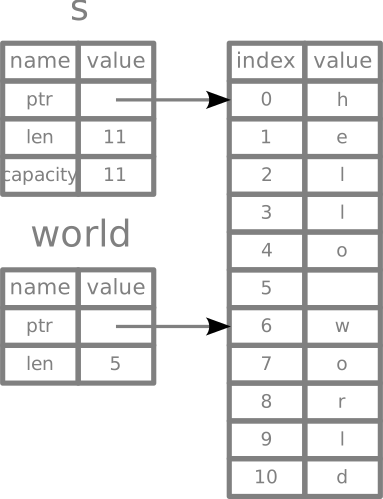
let s = String::from("hello");
let len = s.len();

// trailing index can be dropped if it referes to the last element
let slice = &s[3..len];
let slice = &s[3..];

// preceding index can be dropped if it referes to the 0 element
let slice = &s[0..len];
let slice = &s[..];
enum
enum creates a type which can hold one of different variants. Enums are particularly powerful in Rust and are the idiomatic way to represent state and handle various data patterns.
Basic Enum Usage
enum SimpleEnum {
  FirstVariant,
  SecondVariant,
  ThirdVariant,
}

enum ComplexEnum {
  Nothing,
  Something(u32),
  LotsOfThings {
    usual_struct_stuff: bool,
    blah: String,
  }
}
enum variants can hold different types of data:
enum IpAddrKind {
  V4(u8, u8, u8, u8), // enum variants with list u8 data
  V6(String),         // enum variants with string data
}

enum Message {
  Quit,                       // variant with no data
  Move { x: i32, y: i32 },    // variant with anonymous struct
  Write(String),              // variant with string
  ChangeColor(i32, i32, i32), // variant with three integers
}
impl Message {
  fn some_function() {
    println!("some text")
  }
}

fn main() {
    let localhost = IpAddrKind::V4(127, 0, 1, 1);
}
match goes well with enums because all variants need to be matched:
enum Coin {
  Rappen,
  Franken,
  Zweifänkler,
  Fünfliber,
}

fn value_in_rappen(coin: Coin) -> u8 {
  match coin {
    Coin::Rappen => 5,
    Coin::Franken => 100,
    Coin::Zweifränkler => 200,
    Coin::Fünfliber => 500,
  }
}
Enums for State Management
Enums are the idiomatic way to represent state in Rust applications. Instead of using bool or integer constants, use enums to make your code more expressive and type-safe.
❌ Avoid using bool for state:
struct User {
    name: String,
    active: bool, // What does false mean? Inactive? Suspended? Deleted?
}
✅ Use enums instead:
use chrono::{DateTime, Utc};

#[derive(Debug, Clone)]
enum UserStatus {
    /// The user is active and has full access
    Active,
    /// The user's account is inactive but can be reactivated
    Inactive,
    /// The user's account has been temporarily suspended
    Suspended { until: DateTime<Utc> },
    /// The user's account has been permanently deleted
    Deleted { deleted_at: DateTime<Utc> },
}

struct User {
    name: String,
    status: UserStatus,
}
State Transitions with Methods
You can implement methods on enums to handle state transitions safely:
impl UserStatus {
    /// Suspend the user until the given date
    fn suspend(&mut self, until: DateTime<Utc>) {
        match self {
            UserStatus::Active => *self = UserStatus::Suspended { until },
            // For all non-active states, do nothing
            _ => {}
        }
    }

    /// Activate the user
    fn activate(&mut self) -> Result<(), &'static str> {
        match self {
            // A deleted user can't be activated!
            UserStatus::Deleted { .. } => Err("can't activate a deleted user"),
            _ => {
                *self = UserStatus::Active;
                Ok(())
            }
        }
    }

    /// Delete the user permanently
    fn delete(&mut self) {
        if let UserStatus::Deleted { .. } = self {
            // Already deleted, don't update timestamp
            return;
        }
        *self = UserStatus::Deleted {
            deleted_at: Utc::now(),
        }
    }

    // Helper methods for checking state
    fn is_active(&self) -> bool {
        matches!(self, UserStatus::Active)
    }

    fn is_suspended(&self) -> bool {
        matches!(self, UserStatus::Suspended { .. })
    }
}
Option
Option is also an enumof a generic types. It contains None or Some(). It is included by default in the scope.
enum Option<T> {
  None,            // no value
  Some(T),         // some value
}
Examples of Optional types.
let some_number = Some(5);             // type Option<i32> inferred
let some_string = Some("a string");    // type Option<&str> inferred
let absent_number: Option<i32> = None; // type can't be inferred
To extract a value from an Optional all possible variants needs to be covered .
let x: i8 = 5;
let y: Option<i8> = Some(5);

// use value of y if there is Some otherwise use default value
let sum = x + y.unwrap_or(0);
fn plus_one(x: Option<i32>) -> Option<i32> {
  match x {
    None => None,
    Some(i) => Some(i+1),
  }
}
Result
Result is also an enum of generic types. It contains a Ok value or an Err.
enum Result<T, E> {
  Ok(T),
  Err(E),
}
struct
Block of data grouped together. Can derive traits and implement methods or associated methods
#[derive(Debug)] // basic debug trait implementation
struct Rectangle {
  width: u32,
  height: u32
}

// multiple impl possible
impl Rectangle {
  // Method (function tied to an instance of a struct)
  fn area(&self) -> u32 {
    self.width * self.height
  }

  fn can_hold(&self, rectangle: &Rectangle) -> bool {
    let area1 = self.area();
    let area2 = rectangle.area();

    return area1 > area2;
  }
}
impl Rectangle {
  // associated method (missing the &self, not tied to an instance of a struct
  fn square(size: u32) -> Self {
    Rectangle {
      width: size,
      height: size
    }
  }
}

fn main() {
  let rect = Rectangle {
    width: 30,
    height: 50,
  };
  let rect1 = Rectangle {
    width: 20,
    height: 40,
  };
  let rect2 = Rectangle {
    width: 40,
    height: 50,
  };
  let _rect3 = Rectangle::square(30);

  println!("rect can hold rect1: {}", rect.can_hold(&rect1));
  println!("rect can hold rect2: {}", rect.can_hold(&rect2));
  println!("rect: {:?}", rect); // debug print
  println!("rect: {:#?}", rect); // debug print with line fix

  println!("The width of rect is {} pixels", rect.width);
  println!("The area of rect is {} pixels", rect.area());
}
Collections
Dynamic datatypes (partly shown above) stored in the heap and can shrink and grow over time.
vec Vector
vec can store only one type of elements
Creating vector
let v:Vec<i32> = Vec::new(); // type can't be inferred and needs to be explicitaly mentioned
v.push(1);
v.push(2);
v.push(3);

let v2 = vec![1,2,3];        // type can be inferred. the vec! macro allows initilising the vector from start
Accessing vector elements
let v = vec![1,2,3,4,5];

// accessing an existing element
let third: = &v[2];
println!("The third element is {}", third);

// accessing inexisting element
let twenty: = &v[20];  // possible but out of bound error during runtime

// using get method
match v.get(20) {
  Some(twenty) => println!("The twenty element is {}", twenty),
  None => println!(There is no twenty element)
}

// iterating over all elements read only
for i in &v {
  println!("{}", i)
}

// iterating over all elements
for i in &mut v {
  *i += 50;
}
For a vector to represent multiple types at the same time a enum can be used
enum SpreadsheetCell {
  Int(i32),
  Float(f64),
  Text(String),
}

let row = vec![
  SpreadsheetCell::Int(3),
  SpreadsheetCell::Text(String::from("blue")),
  SpreadsheetCell::Float(10.12),
];

match &row[1] {
  SpreadsheetCell::Int(i) => println!("{}", i),
  _ => println!("Not a integer!")
};
String
Are encoded at UTF-8 encoded bytes. Each character can have between 1-3 bytes.
// creating a string
let s1 = String::new();                    // String type
let s2 = "initial content";                // &str type
let s3 = s2.to_string();                   // String type
let s4 = String::from("initial contents"); // String type

// appending to a string
let mut s = String::from("foo");
s.push_str("bar");    // push string slice
s.push('!');          // push char

let s1 = String::from("Hello, ");
let s2 = String::from("world!");
let s3 = format!("{}{}", s1, s2);
Indexing into a String
let namaste: String = String::from(“नमस्ते”);

// bytes representation
// [224, 164, 168, 224, 164, 174, 224, 164, 184, 224, 165, 141, 224, 164, 164, 224, 165, 135]
for b in “नमस्ते”.bytes() {
  println!("{}", b);
}

// char representation
// ['न', 'म', 'स', '्', 'त', 'े']
for c in “नमस्ते”.chars() {
  println!("{}", c);
}

// grapheme clusters
// ["न", "म", "स्", "ते"]
use unicode_segmentation::UnicodeSegmentation;

for g in “नमस्ते”.graphemes(true) {
  println!("{}", g);
}
HashMap's
Allows to store key-value pairs
use std::collections::HashMap

let blue = String::from("Blue");
let yellow = String::from("Yellow");

let mut scores = HashMap::new();

scores.insert(blue, 10); // ownership of Strings are moved into the HashMap
scores.insert(yellow, 50);

// accessing and element
let team_name = String::from("Blue");
let score = scores.get(&team_name);

// iterating over HashMap
for (key, value) in &scores {
  println!("{}: {}", key, value);
}
Updating the HashMap
let mut scores = HashMap::new();

scores.insert(String::from("Blue"), 10);
scores.insert(String::from("Yellow"), 20);

// write an entry if None exist
scores.entry(String::from("Yellow")).or_insert(30);
scores.entry(String::from("Yellow")).or_insert(40);
Example word count
let text = "Hello world wonderful world";

let mut map = HashMap::new();

for word in text.split_whitespace() {
  let count = map.entry(word).or_insert(0);
  *count += 1;
}

println!("{:?}", map);
Operations
fn main() {
  // addition
  let sum = 5 + 10;

  // subtraction
  let difference = 95.5 - 4.3;

  // multiplication
  let product = 4 * 30;

  // division
  let quotient = 56.7 / 32.2;
  let truncated = -5 / 3;     // Results in -1

  // remainder
  let remainder = 43 % 5;
}
Type Convertions
Using as for type casting
The as keyword is used for basic type casting between primitive types. It's a simple way to convert, but it can be unsafe because it might truncate values if the destination type is smaller than the source type. For example, converting a u16 to a u8 will silently drop the upper 8 bits.
let a: u16 = 511;
let b: u8 = a as u8; // b is now 255, the lower 8 bits of 511 (0b11111111)

let f: f32 = 3.14;
let i: i32 = f as i32; // i is now 3, the fractional part is truncated
Traits From and Into
The From and Into traits provide a more robust and idiomatic way to handle type conversions. If you implement the From trait for your type, the Into trait is automatically implemented for the other type. This is used for infallible conversions.
From is used to define how to create your type from another type.
Into is used to convert your type into another type.
// String implements From<&str>
let my_str = "hello";
let my_string = String::from(my_str);

// Thanks to Into, we can also do this:
let other_string: String = my_str.into();

// Example of implementing From
#[derive(Debug)]
struct MyNumber(i32);

impl From<i32> for MyNumber {
    fn from(item: i32) -> Self {
        MyNumber(item)
    }
}

let num = MyNumber::from(30);
let int_num: MyNumber = 30.into();
println!("MyNumber: {:?}", num); // MyNumber(30)
println!("MyNumber from into: {:?}", int_num); // MyNumber(30)
Traits TryFrom and TryInto
These traits are used for fallible conversions, where a conversion might fail. They return a Result type, which is Ok(value) on success and Err(error) on failure. This is safer than as because it forces you to handle the possibility of a conversion error.
use std::convert::TryFrom;

#[derive(Debug, PartialEq)]
struct EvenNumber(i32);

impl TryFrom<i32> for EvenNumber {
    type Error = ();

    fn try_from(value: i32) -> Result<Self, Self::Error> {
        if value % 2 == 0 {
            Ok(EvenNumber(value))
        } else {
            Err(())
        }
    }
}

// Successful conversion
assert_eq!(EvenNumber::try_from(8), Ok(EvenNumber(8)));

// Failed conversion
assert_eq!(EvenNumber::try_from(5), Err(()));
Traits AsRef and AsMut
The AsRef and AsMut traits are used for cheap, reference-to-reference conversions. They are not about converting one type to another, but rather about getting a reference to a type from another type. This is often used in functions to accept a wider range of types (e.g., both String and &str) without taking ownership.
AsRef<T> provides a method .as_ref() to get a &T.
AsMut<T> provides a method .as_mut() to get a &mut T.
fn print_str<S: AsRef<str>>(s: S) {
    println!("{}", s.as_ref());
}

let my_string = String::from("hello");
let my_str = "world";

print_str(&my_string); // prints "hello"
print_str(my_str);     // prints "world"

let mut s = String::from("foo");
let mut_ref: &mut str = s.as_mut();
mut_ref.make_ascii_uppercase();
println!("{}", s); // prints "FOO"
we use privacy-first analytics
that don't track you with cookies.
no personal data is collected.
GDPR & CCPA compliant.